


Table of contents
Linear Integration Overview
Engineering teams choose Linear for its speed and clean structure. When you connect Linear to WorkSights, issue activity flows into the same timeline as delivery work, communication, and client interactions. Leaders get a real picture of engineering momentum without waiting for status updates or sitting through review meetings.
WorkSights ingests issue events, comments, and project activity from Linear in real time. Only metadata is received: issue identifiers, titles, states, and comment text previews. WorkSights does not store full issue descriptions or complete comment content.
For connection steps, see Linear Setup.
How Linear Activity Appears
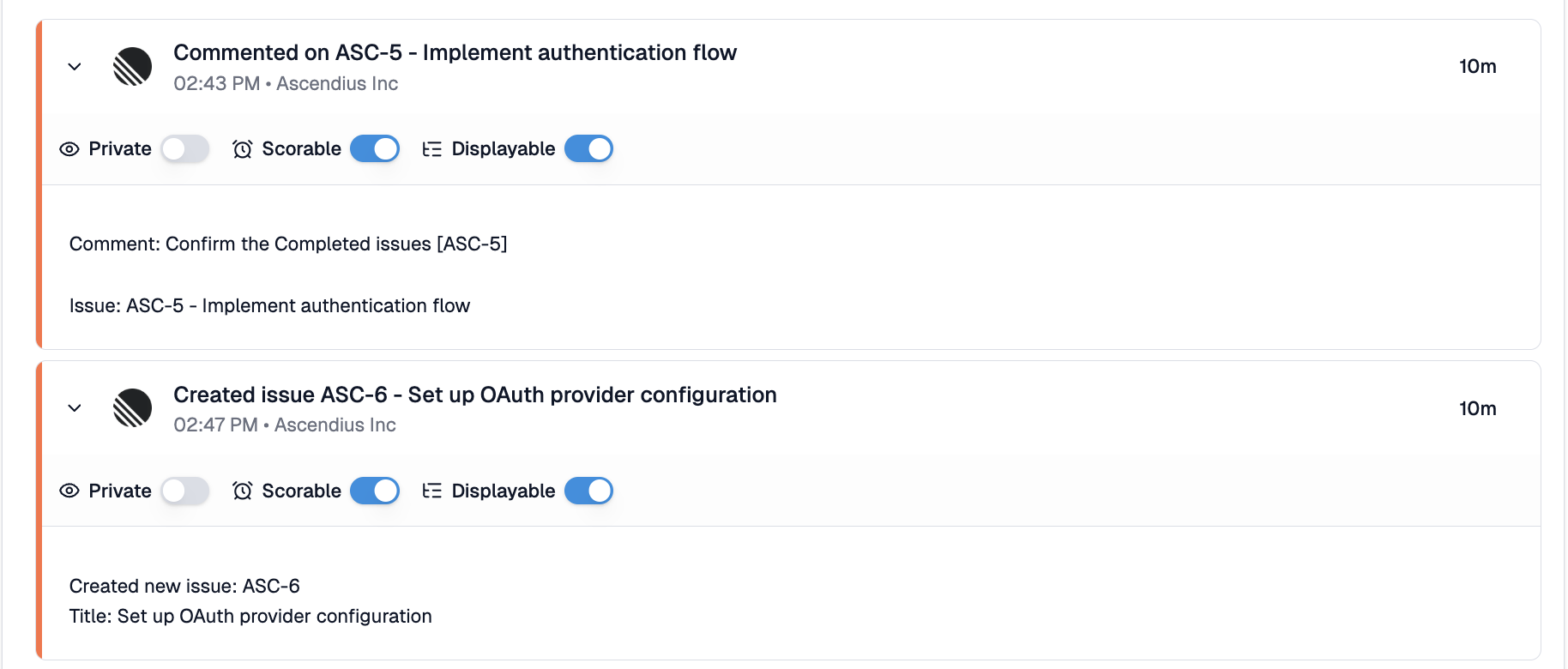
WorkSights displays Linear activity using Linear's identifier and title format. Issue activities show the action and the issue: Created issue ENG-123 - Fix login bug, Updated issue ENG-123 - Fix login bug, Completed issue ENG-123 - Fix login bug. State changes are detected and reflected in the activity title: created, updated, completed, and cancelled each produce distinct activities. The detail field shows the issue identifier, title, and current state.
Comments appear linked to the issue they belong to: Commented on ENG-123 - Fix login bug. The first 80 characters of the comment text appear in the detail field.
Project, document, and label events appear as generic activities showing what type of object was affected and what action occurred, for example Linear update: Project - Website Redesign or Linear create: ProjectLabel - feature. These capture that an organizational change occurred without detail on what specifically changed.
Sub-issues appear as individual issue activities with their own identifier. There is no visual distinction between a top-level issue and a sub-issue in the timeline.
Timestamps on Linear activities reflect when the action actually occurred in Linear, not when the event was delivered to WorkSights. Completed and cancelled issues use their completion or cancellation time.
What WorkSights Receives
WorkSights ingests only the metadata Linear provides through its webhook model:
- Issue events: created, updated, completed, cancelled, and assigned
- Comments on issues, with a text preview of up to 80 characters
- Project, document, and label events as generic activity
- Workspace member information for user attribution
WorkSights does not ingest issue descriptions, full comment content, cycles, emoji reactions, customer requests, or app events such as inbox notifications and permission changes.
Integration Page Overview
The Linear integration page contains three tabs:
- Overview: connection status and integration owner
- Users: Linear workspace members mapped to WorkSights users
- Connections: connected Linear workspaces
Linear events identify users by ID rather than email. Users are matched to WorkSights accounts by email address at connection time. Manual mapping is available for any users who did not match automatically.
Data Access and Privacy
WorkSights accesses Linear through OAuth authorization. The integration is read-only.
WorkSights receives:
- Issue identifiers, titles, and state changes
- Comment text previews up to 80 characters
- Project, document, and label event metadata
- Workspace member information for user mapping
WorkSights does not receive:
- Full issue descriptions or complete comment content
- Cycle data
- Attachment files or linked assets
- Any content beyond issue tracking metadata
Troubleshooting
If Linear activity is not appearing:
- Confirm users are mapped in the Users tab. Linear events identify users by ID, so users must be synced at connection time for activity to be attributed correctly. If activity arrived before user sync completed, trigger a manual user sync from the Users tab.
- Confirm the affected user's email in Linear matches their WorkSights email. Mismatched emails will not map automatically and require manual matching.
If a comment shows as "Commented on - Untitled":
- The comment was left on a project rather than on an issue. Comments on projects do not carry an issue identifier or title. Comments on issues display correctly with the full identifier and title.
If activity appeared but shows no user attribution:
- A webhook event may have arrived before user sync completed. Trigger a manual user sync from the Users tab to resolve mapping for future events.